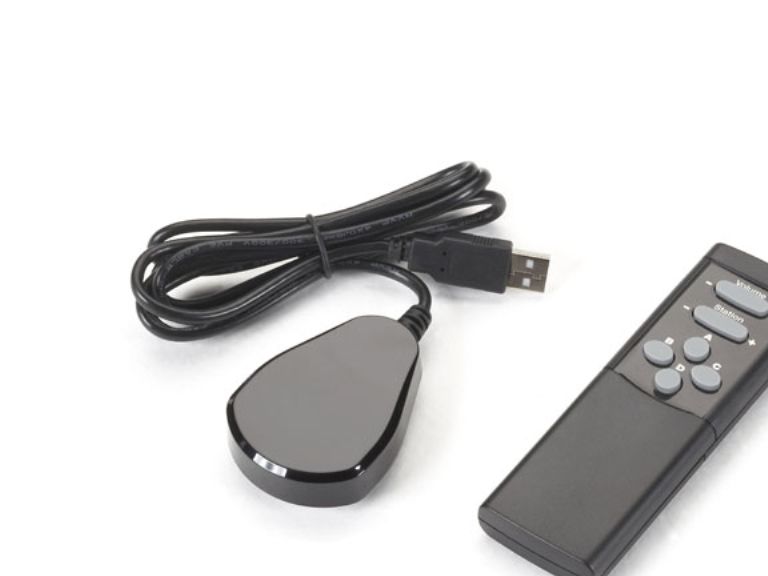
Black Box ICOMP-RC, PC, IR Kabelfri, Trykknapper, Svart
Varenr.: [4745913] | Producent: Black box | Model-nr.: ICOMP-RC
Ikke på lager
Varen er ikke på lager.
Utsolgt
Varen er ikke på lager.
Leveringsalternativer - Velges i kassen
Instabox - Velg din nærmeste pakkeboks
Gratis frakt
Bring – Leveres til pakkeboks nær deg
Gratis frakt
Bring – Leveres på hentested nær deg
Gratis frakt
PorterBuddy - Fleksibel hjemlevering - levert på døren på kvelden
174,00
Bring - Fleksibel hjemlevering - Levering til døren (om kvelden i større byer)
199,00
Vis alle leveringsalternativer (5)
Fraktprisen er basert på levering til dette postnummer:0015 - OSLO Skift postnummer
Oppgi postnummer for levering. Lagre
NOK
2.185,00
eksklusiv MVA 1.748,00
Totalt inkl. frakt
2.185,00
Gi meg beskjed når varen er på lager igjen.
Email:
Lageragent opprettet, vi sender en mail når varen er på lager igjen!
Denne funksjonen krever at man er logget inn. Opprett en bruker og liste systemet for å holde styr på fremtidige kjøp eller ønskelister. Opprett bruker Login
Quick Facts - Handheld IR unit for controlling iCOMPEL content and volume at a display. - Push a button to select content (videos, images, and even layouts and playlists). - Also controls TV channel selection on iCOMPEL TV capture versions.
Further Details - Features four assignable buttons for customized control and playing video on demand. - Enables administrators to delegate control of local content to local users. - Content inside a single zone or across multiple zones can be switched in sync. - Includes IR sensor on cord that plugs into iCOMPEL unit’s USB port. - “Pick list” creation function for restricting what TV content can be shown.
Control the content on your iCOMPEL digital signage easily with this handheld remote control unit.
With it added to your iCOMPEL system, you can control what content and messaging is being displayed on-screen at any time—right at the screen itself. There’s no need to log in to the user interface when you want to get a desired video or presentation to appear. At a press of a button, you can select the content you want and switch layouts previously set up in iCOMPEL.
What’s more, the remote control works right out of the box. Simply connect its IR receiver to a USB port on the iCOMPEL, and you have volume control in a matter of seconds.
Also, if you’re using an iCOMPEL model with a built-in video card and receiving signals from the TV tuner (or audio from the radio tuner), you can use the remote to scan the channel list or change the channel volume without any configuration or set up. Without the remote, this can be only done via the iCOMPEL user interface.
Ideal applications. Adding remote control functionality to your iCOMPEL is ideal for: - Museums and exhibit applications. - Signage used for sales presentations at trade shows. - Anywhere you frequently need to adjust volume.
It’s also great for giving viewers the ability to access content themselves, such as in: - PoS/PoP retail applications. - Hotels and conference centers. - Government offices and DMVs. - Doctors’ office and hospital waiting rooms.
In addition, it’s particularly useful in applications where installing touchscreen signage isn’t practical or affordable—especially if you just want to give an audience on-demand access to several slideshows of content.
Flexible content control by zone. Content can be switched inside a single zone or across multiple zones in sync. You can keep logos and branding fixed and uninterrupted in one part of the screen, while videos and other content in other zones can be flexibly changed by pushing a remote control button.
The four buttons on the remote are assignable. By assigning specific video clips and layouts to the buttons, they can be selected on demand. Choose a video to play in a zone when you want—for example, when an important customer arrives—then when it ends, that zone’s playlist content will resume play according to its preset schedule.
The buttons also integrate with features of iCOMPEL. Using the AdvanceTo feature, you can interrupt the playing of a playlist and jump to a specific item in the playlist.
You can also set up “pick lists” containing playlists of specific content, including certain TV stations or radio stations, for example. These pick lists appear in a dropdown menu on the iCOMPEL screen*. By restricting the selection to specific lists, you can prevent users from playing objectionable content through your signage.
* Not only can this function be enabled for access by users of the remote control, but it can also be enabled for any local user accessing content in Ad-Hoc mode via the iCOMPEL user interface.
NOTE: A no-charge license will be provided for activating IR functionality on your iCOMPEL model. Also, the remote control works only with iCOMPEL units running 8.1.1 firmware or above. For information on getting the necessary firmware, contact Black Box Tech Support or your Digital Signage Success Manager.
Videoopptaksgrensesnitt
IR Kabelfri
Egnet bruk for fjernkontroll
PC
Produktfarge
Svart
Inngangstype
Trykknapper
Knapper for bakgrunns lys
Nei
Tilpassbare knapper
Nei
Antall knapper
6
Kompatibilitet
iCOMPEL
Innebygd skjerm
Nei
Kabler inkludert
IR-sensor
USB nødvendig
Ja
Samsvarssertifikat
RoHS
Produktet har følgende varenummer i vårt system:
SKU:
ICOMP-RC
Hvorfor ser jeg at det samme produktet er tilgjengelig på forskjellige varenumre?
Produsenter lanserer ofte det samme produktet med forskjellige varenumre, vanligvis bare forskjellige versjoner av emballasjen. For eksempel kan emballasjen være rettet mot forskjellige land.
Vi gjør vårt beste for å forene produktene, men det kan skje at det samme produktet vises på forskjellige varenumre i systemet vårt.