PorterBuddy - Fleksibel hjemlevering - levert på døren på kvelden
174,00
Bring - Fleksibel hjemlevering - Levering til døren (om kvelden i større byer)
199,00
Vis alle leveringsalternativer (5)
Fraktprisen er basert på levering til dette postnummer:0015 - OSLO Skift postnummer
Oppgi postnummer for levering. Lagre
NOK
3.599,00
eksklusiv MVA 2.879,20
Totalt inkl. frakt
3.599,00
Gi meg beskjed når varen er på lager igjen.
Email:
Lageragent opprettet, vi sender en mail når varen er på lager igjen!
Denne funksjonen krever at man er logget inn. Opprett en bruker og liste systemet for å holde styr på fremtidige kjøp eller ønskelister. Opprett bruker Login
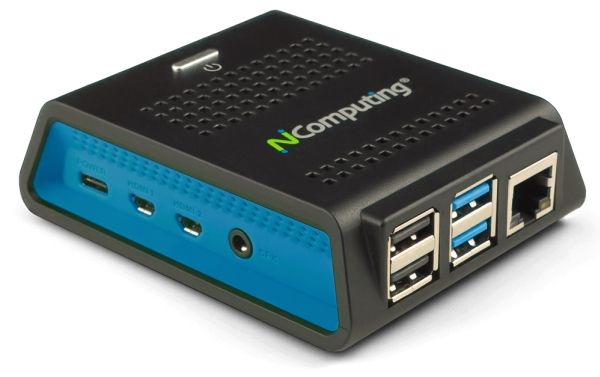
NEXT-GENERATION THIN CLIENT DESIGNED FOR MICROSOFT WINDOWS 365, AVD, RDS, VERDE VDI & REMOTE PC ACCESS, AND VSPACE PRO DESKTOP VIRTUALIZATION The RX420(RDP) cloud-ready thin client is built on the Raspberry Pi 4 platform to achieve compelling performance and value. The RX420(RDP) bring premium performance and native dual display support, providing a rich PC-like experience in an affordable, energy saving device with a small footprint.
Integrated local Chromium browser support provides additional flexibility such as web kiosk mode or productivity mode with direct access of web content and web apps without desktop virtualization.
RX420(RDP) provides a simple-to-deploy, centrally managed, high-performance virtual desktop.
VERIFIED MICROSOFT Azure Virtual Desktop (AVD) SOLUTION Azure Virtual Desktop (AVD) is a comprehensive desktop and application virtualization service managed by Microsoft and hosted in the Azure cloud. AVD delivers simplified management with multi-session Windows 10 support.
NComputing is an official Azure Virtual Desktop partner for integrated Linux thin client solutions verified by Microsoft. Our optimized and verified thin clients raise the bar.
Optimized for vSpace Pro Enterprise RX420(RDP) delivers virtual desktops from 13 popular Windows operating systems, including Windows 10 & 11, Windows Server 2019 & 2022. The new UXP Turbo protocol delivers an enhanced desktop experience with PC-like performance for 3D rendering, browser scrolling, video playback and multimedia-intensive applications. UXP Turbo works with vCAST Streaming, providing higher quality video streaming without CPU bottlenecks.
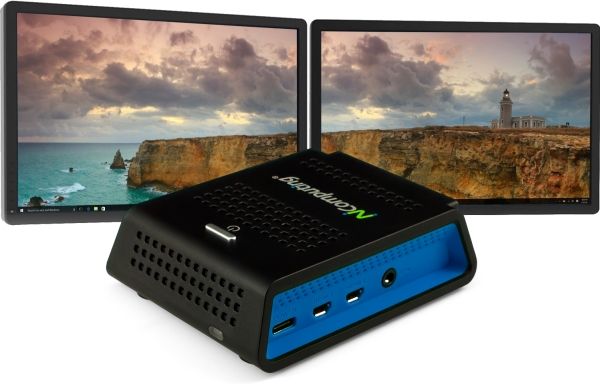
NATIVE DUAL MONITOR DISPLAY The new RX420(RDP) thin client comes with premium performance and native dual display support.
Supercharge video streaming - No expensive GPUs required vCAST Streaming delivers direct streaming of content to our endpoint devices, reducing the overall server-side CPU usage for web videos like YouTube and Vimeo, and local media content without the need for expensive GPUs. By conserving server-side hardware resources and bandwidth, more concurrent user sessions can run while ensuring the same high quality HD video experience.
While vCAST Streaming is native to vSpace Pro Enterprise, the features can be enabled on Microsoft RDS deployments by installing our SuperRDP server pack, available through your NComputing reseller (SKU: SuperRDP-PREM-VC-P).
Microsoft Teams Optimization Available on RX420(RDP) and RX440(RDP) thin clients, audio and video streams in Microsoft Teams are offloaded from the Microsoft AVD, Windows 365, and RDS sessions, enabling them to be processed locally on the client device. Deliver clear, crisp high-definition audio-video conferencing via our Microsoft Teams optimization. Users can seamlessly participate in audio-video or audio-only calls to and from other users and other standards-based desktop video and conference room systems. (requires firmware 5.12.4 or higher)
INTEGRATED LOCAL CHROMIUM BROWSER SUPPORT RX420(RDP)'s integrated local Chromium browser provides additional flexibility for direct access of web content and web apps without desktop virtualization.
The integrated Chromium browser can be configured for stand-alone kiosk mode, or productivity mode where the user can use the local browser side-by-side with their virtualized apps/desktops envrionment.
BROAD USB PERIPHERAL SUPPORT With integrated transparent USB redirection, RX420(RDP) utilizes device drivers from the server side to provide extensive peripheral support including mass storage, smart card readers, audio devices, printers, imaging devices (e.g., webcams), serial devices, HID and custom devices (identified by Vendor ID and Product ID).
Enhanced single-touch and multi-touch screen support with built-in calibration tool are supported in native RDP connections.
Next-Level Endpoint Security By implementing NComputing’s solutions, organizations can enhance endpoint security, safeguard sensitive data, reduce costs, and streamline management. These measures cover the entire endpoint security spectrum, from device boot to locked-down operating systems, secure communications, data leakage prevention, and centralized management.
Read the NComputing security whitepaper to learn how our endpoint solution enhances next-level endpoint security.
PMC Endpoint Manager software makes deployment and management quick and easy. The RX420(RDP) is easily configured using PMC Endpoint Manager software by NComputing. An admin can remotely manage RX420(RDP) devices over local and wide-area networks, including locations behind firewalls and NAT-routers through an easy-to-use, web-based user interface.
PMC comes with automatic discovery, check-in and configuration provisioning of new devices making deployment easy.
Administrators setup device profiles complete with all settings and configurations, then push the profile to individual or grouped devices. Only a few clicks are needed to schedule device firmware updates, access the summary dashboard or view the detailed event logging. Users are always up-to-date with the latest technology.
Flexible deployment through ethernet or Wi-Fi connections RX420(RDP) comes with built-in 10/100/1000 Ethernet and dual-band 2.4/5GHz WiFi (802.11 b/g/n/ac) with Personal and Enterprise 802.1x security authentication support. Organizations are no longer bound to the wiring infrastructure and can deploy RX420(RDP) in any location with Wi-Fi access to deliver the desktop experience.
Hvorfor ser jeg at det samme produktet er tilgjengelig på forskjellige varenumre?
Produsenter lanserer ofte det samme produktet med forskjellige varenumre, vanligvis bare forskjellige versjoner av emballasjen. For eksempel kan emballasjen være rettet mot forskjellige land.
Vi gjør vårt beste for å forene produktene, men det kan skje at det samme produktet vises på forskjellige varenumre i systemet vårt.